
Background
When a large consulting customer decided to modernize the database tier of their flagship platform, the scope was ambitious: migrate more than 20 production databases from RDS SQL Server to Amazon Aurora PostgreSQL with Babelfish. The goal was to dramatically reduce costs and support the customer’s ongoing effort to achieve FedRAMP compliance. Evolve Cloud Services led the database migration effort as the customer’s AWS modernization partner.
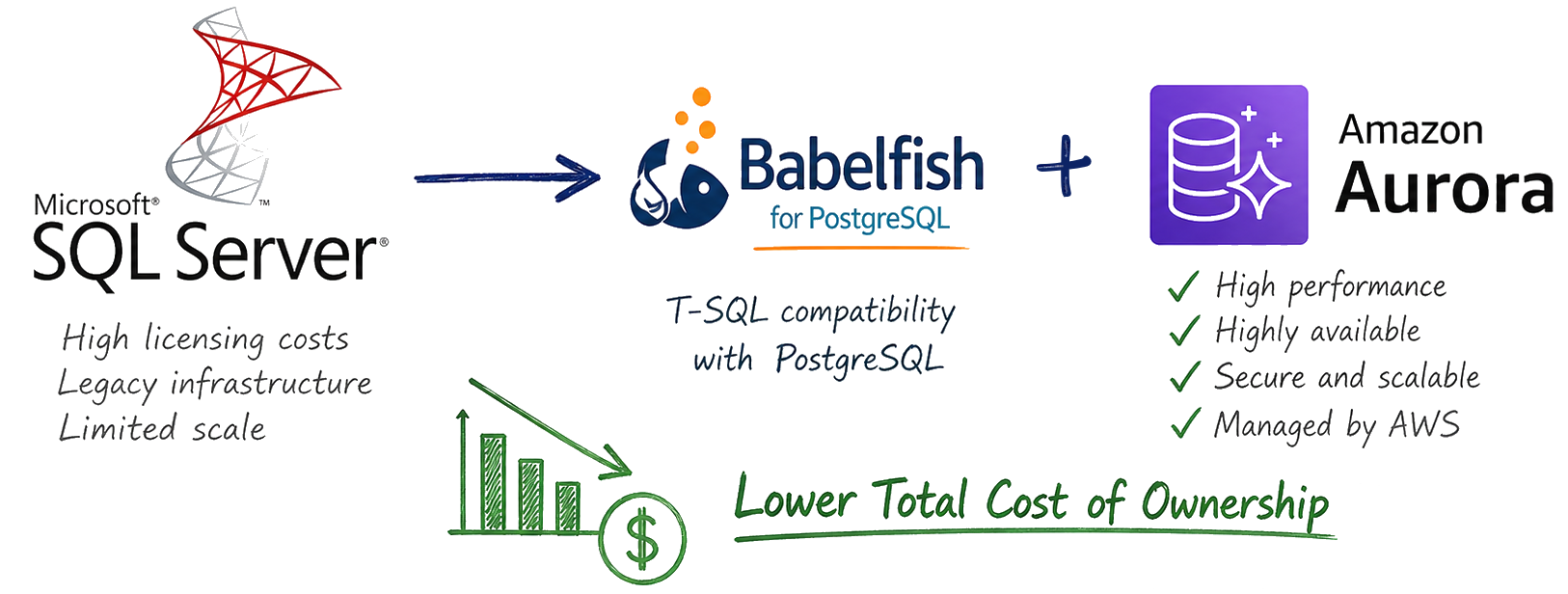
Babelfish was a key enabler for this migration: it provides a TDS (Tabular Data Stream) endpoint on top of PostgreSQL that understands T-SQL, allowing the existing stored procedures in T-SQL to be migrated with very few changes, and for .NET applications to connect using their original SQL Server drivers, ORMs, and generated queries with minimal code changes. This meant the team could migrate databases iteratively without a risky “big bang” cut-over, and the application code could largely continue using the .NET SqlClient library and T-SQL while the underlying engine shifted from SQL Server to PostgreSQL.
There was one piece of the migration that AWS services couldn’t solve though: the developer experience and expectations for continuing with a local database for development.
Previously, developers had been running SQL Server Developer Edition on their laptops, restoring .bak backup files pulled from an S3 bucket to seed their local databases with data from the shared DEV environment. This workflow was well-understood and gave each developer an independent copy of the database they could modify freely. With the migration to Aurora PostgreSQL with Babelfish, that workflow needed a new equivalent. As the customer wanted to move in the direction of containers for local app development, the desire was for a container-based deployment model for local databases as well.
The Challenge
Amazon Aurora PostgreSQL with Babelfish is a managed cloud service. There is no “Aurora Developer Edition” that runs on a laptop. Unlike SQL Server, where Microsoft provides a free Developer Edition that is functionally identical to the production engine, there is no out-of-the-box equivalent for running Aurora PostgreSQL with the Babelfish extension locally. This led to the following requirements for a local database solution:
- Latency and independence: The dev team is globally distributed, so having every developer connect to a shared Aurora DEV instance in AWS wasn’t viable due to latency. But more important, moving to a shared DEV database would break isolation between developers — one developer’s schema changes or test data could break another team’s work in progress. So we definitely needed to retain having a local database.
- Platform fidelity. One idea initially floated was to continue using SQL Server locally, since we had already updated the codebase with “Babelfish detection” for the relatively small number of cases where different code was needed for Babelfish vs SQL Server; the cut-over to Aurora was done in stages, so the codebase supports both. However, that would risk having developers introducing Babelfish-specific compatibility bugs that would then only show up in the DEV or TEST environments.
- Ease of deployment. The solution needed to be simple for developers to set up and use. Asking every developer to configure PostgreSQL with Babelfish themselves, or run a restore from backup would be a non-starter, especially since the restore process takes tens of minutes due to the large amount of data. The team was already comfortable with Docker from the application containerization effort, so containers were the natural delivery mechanism.
- Data persistence across updates. Developers and QA testers make local changes for testing – both schema and data changes. The QA team especially curates data sets for weeks at a time, so those changes need to survive container restarts and even container image updates for security fixes, etc. At the same time, they need the ability to periodically refresh their local database from the DEV environment to pick up the latest schema changes and baseline data.
- Automated backup process: While AWS offers automated backups for Aurora, those backups are not accessible in a way that can be restored outside the cloud. And standard PostgreSQL backup tools like
pg_dumpandpg_dumpalldon’t capture the TDS endpoint roles, schema mappings, and other Babelfish-specific configuration. Fortunately there are Babelfish-specific versions of these (bbf_dumpandbbf_dumpallfrom the BabelfishDump package) that do correctly capture the full Babelfish catalog structure.
The Solution
Overview
At a high level, our initial solution looked like the diagram below, with an ephemeral compute instance running a shell script that performed the backup using bbf_dump + bbf_dumpall and then pulled a base PostgreSQL + Babelfish database engine container image from ECR (Amazon Elastic Container Registry) and started it, restored the data to that engine, and finally used Docker commit to create a new image that has the database engine and all the DEV data baked into it, before pushing it to another ECR repository, tagged as the latest developer database version.
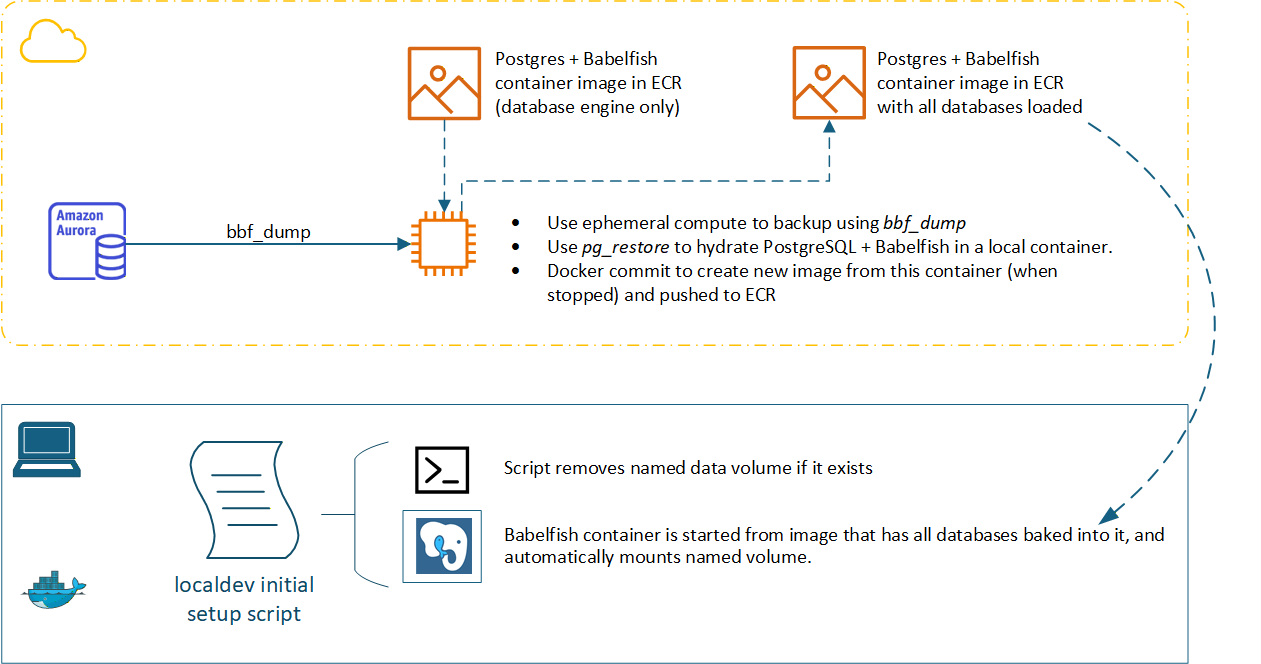
We created a shell script that performed all these steps running locally to prove it out. After some discussion, the customer decided to break up the two main processes (performing the backup, and restoring to a “loaded” image) and implement them separately as containerized workloads. This led to the development of three different container images as detailed below.
Base PostgreSQL + Babelfish Engine Container
The foundation of the solution is a container image that runs the same version of PostgreSQL and Babelfish as the Aurora DEV cluster — PostgreSQL 17.5 with Babelfish 5.2.0 running on Amazon Linux. The customer didn’t want to rely on community-maintained Docker images that we found that packaged PostgreSQL with Babelfish, especially since we needed to make minor changes, so we used the Dockerfile and shell script from Jonathan Pott’s excellent docker-babelfish GitHub repository as a starting point rather than starting from scratch with the babelfish-for-postgresql project. We mainly needed to update this to use the correct (paired) version of PostgreSQL and Babelfish, and to remove the Docker VOLUME directive in order to build a “fully loaded” container image that had both the database engine and all the DEV data. Later, when developers run a container from this “fully loaded” image, they specify a named volume for persisting the database (the actual commands to pull and start the container are abstracted away into a local dev script in reality).
The Dockerfile uses a multi-stage build: the first stage compiles PostgreSQL, the ANTLR parser runtime, and the four Babelfish extension modules (babelfishpg_common, babelfishpg_money, babelfishpg_tds, and babelfishpg_tsql) from the tagged release matching the Aurora version. The second stage copies only the compiled binaries into a slim Ubuntu runtime image, keeping the final image size manageable.
The container’s entrypoint script handles first-run initialization, and this is where things differ most from what a SQL Server developer might expect. Setting up Babelfish is not just installing a package, it requires a specific sequence of database-level configuration, extension installation, and initialization before the T-SQL endpoint is usable. We made only minor modifications to the script from the docker-babelfish GitHub repo mentioned earlier, and you can view that script here.
On first boot, the script checks whether postgresql.conf already exists in the data directory. If it does not, it initializes a fresh database cluster with initdb -E "UTF8" and then appends the critical Babelfish settings into postgresql.conf which has settings for things like the Babelfish TDS protocol layer, the TDS listener endpoint, and the Babelfish “migration mode”; Babelfish can operate in two modes that control how Babelfish maps SQL Server databases to PostgreSQL schemas. In multi-db mode, each SQL Server “database” becomes a separate PostgreSQL schema, which is the mode used by the customer’s Aurora database setup, and which allowed us to migrate more than 20 SQL Server databases to a single Aurora cluster.
With the engine running, the script creates a superuser (babelfish_user), creates the babelfish_db database, installs the babelfishpg_tds extension and sets the logical database name with ALTER SYSTEM SET babelfishpg_tsql.database_name. After reloading the configuration, it opens a fresh connection and calls CALL SYS.INITIALIZE_BABELFISH(‘babelfish_user’); to apply the migration mode, initialize the T-SQL compatibility layer inside the database, creating the system catalogs and metadata structures that allow Babelfish to accept TDS connections and process T-SQL queries.
The check for postgresql.conf existence makes this startup flow idempotent: the initialization runs exactly once, and on all subsequent container starts — including when a developer’s named volume already contains data — the script skips straight to launching the PostgreSQL server in the foreground with exec postgres. This is what makes the named volume workflow possible: the container can be stopped, deleted, and recreated from the same or a newer image, and as long as the named volume is mounted during docker run, the existing data is preserved and the engine starts without re-initializing.
This “base engine” image exposes both port 5432 (PostgreSQL native protocol) and port 1433 (Babelfish TDS endpoint, emulating SQL Server). Developers can connect with psql or pg_restore on the PostgreSQL port, and the application services connect via the TDS port using their existing SqlClient connection strings, just as they would to Aurora or SQL Server.
Aurora DEV Backup Process Container
This container runs in the DEV AWS account and is responsible only for extracting the backup from Aurora. It uses bbf_dumpall and bbf_dump to create the role and data backups, compresses them into a date-stamped .tar.gz archive, and uploads the archive to an S3 bucket. This container is built on Amazon Linux 2023 (FROM public.ecr.aws/amazonlinux/amazonlinux:2023) with the PostgreSQL 17 client and BabelfishDump utilities pre-installed. For local testing of the script, we downloaded that image from AWS’s public container repo here. The database schema and data, and the database roles are backed up separately:
- Roles from Aurora DEV using
bbf_dumpallwith the--roles-onlyflag. This exports the Babelfish-aware database roles (SQL Server logins mapped to PostgreSQL roles) as plain SQL. The--no-role-passwordsflag omits password hashes for security — developers use known local passwords instead. - Schema and data from Aurora DEV using
bbf_dumpin PostgreSQL custom format (--format=c). This captures the fullbabelfish_dbdatabase including all Babelfish-managed schemas (one per SQL Server “database” in multi-db migration mode), tables, stored procedures, and row data.
Restore and Build Dev Image Container
The container runs separately and handles the “restore and create dev image” process that builds the container image that developers actually pull down and use. It relies on a shell script that uses Docker Buildx along with other tools to accomplish this:
- Downloads the latest backup archive from S3
- Authenticates to ECR and pulls the latest “Base PostgreSQL + Babelfish Engine Container” image
- Launches the engine container and waits for PostgreSQL to become ready by polling with
pg_isready - Strips any
\restrictand\unrestrictmeta-commands from the roles backup (these can cause issues when restoring to a non-Aurora instance) - Restores the roles and then the data to the running database engine container
- Cleans up the backup files from that container to avoid bloating the image
- Stops the container, commits the filesystem as a new image, then pushes it to ECR
The Developer Experience
With backup-restore-build pipeline in place in AWS, a new container image is pushed up to the customer’s private ECR
, the developer workflow becomes straightforward: they just run a “Setup/Update Local Database” PowerShell Core script that does the following:
- Pull the data-loaded image from ECR:
aws ecr get-login-password --region us-east-1 | docker login --username AWS --password-stdin <ecr-url> docker pull <ecr-image-path>:latest - Run the container with a named volume for data persistence:
docker run -d -p 1434:1433 -p 5432:5432 \
-v pgbf-devdata:/var/lib/babelfish/data \
<ecr-image-path>:latest - Connect from applications or SSMS using the same
SqlClientconnection strings, pointed atlocalhost:1434(because most developers also have SQL Server running locally on 1433)
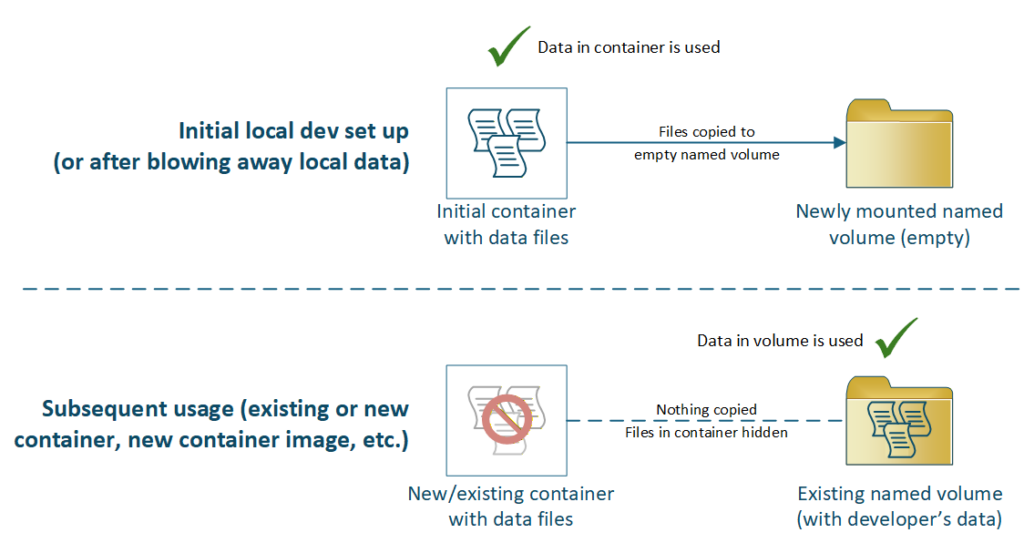
The reason this pattern worked for our customer is the use of the named volume (“pgbf-devdata”), which persists their local changes even between updates of the base database engine container image (as long as the version wasn’t bumped). When a developer or QA is ready to blow away their local changes to refresh from the DEV Aurora database, they just delete the Docker volume, and it’s automatically created anew the next time the script is run:
What this gives engineering teams
By combining the open-source Babelfish-for-PostgreSQL project with local Docker installs, named volumes, and some containerized backup-restore processes, we created an automated mechanism for a local development database environment that delivers three important features for a database modernization effort:
- A platform-faithful runtime. The local container is not a generic PostgreSQL instance — it runs the same Babelfish version as Aurora, with TDS support enabled, multi-db migration mode configured, and the T-SQL compatibility layer initialized. Developers build and test against the same compatibility surface they will rely on in production, catching issues early rather than in shared environments.
- A refreshable-yet-disposable developer environment. Because the entrypoint script conditionally initializes only when the data directory is empty, the container can be destroyed and recreated cleanly at any time. Developers who need a fresh start simply delete their named volume and restart the container – Docker will automatically copy the image’s DEV environment data into the fresh volume, giving them a clean snapshot in seconds.
- An automated process to generate the developer database image. The two-stage pipeline – backup to S3, then restore-and-commit to a container image – runs daily in an existing Kubernetes cluster on ephemeral pods, generating easily-usable containerized copies of the DEV Aurora database. Developers pull the latest image and get current schema and data, with the option of keeping their curated data and schema changes for as long as needed.
Any successful heterogeneous database migration strategy needs to consider more than getting workloads running in test, staging and production. It needs to consider how developers are impacted, and create a realistic local environment where developers can build, test, and troubleshoot against the same stack running in the deployed environment. We think the combination of a Babelfish-enabled container image, a backup-and-commit pipeline, and Docker named volumes delivered that for this project.

